Title here
Summary here

June 15, 20248 minutes
Android and TVOS new features, improvement of input and virtual keyboard, core stabilization... Everything you need to know about 7.242 version
clearBeforeLoad property of ImagePrimitive was only available on Android. It is now available on other renderers. Only CSS renderer does not support this property now.
A new method getSystemLanguage in SystemInfoService class is available to allow you to retrieve system language. It has been separated from getPreferredMenuLanguageof UserSettingsService which allow you to retrieve a language for the application itself.
Some utilities flags & functions have been added to PlayerService :
isMuted : Allow to know if passed session is in muted state or notisPresentationEnabled : Allow to know if passed session has presentation enabled or notgetPlayingState : Retrieve PlayerPlayingState of passed sessionStringUtils.base64Encode and StringUtils.base64decode are now based on specific engine implementations to avoid having specific engine apis inside core methods.
For now, an implementation exists for HTML and NodeJS engines.
@dana dependencies versionIt is now possible to retrieve versions of all dependencies starting by @dana by using method getDanaDependencies from SystemInfoService.
systemInfoService.getDanaDependencies().then(dependencies => {
  // Use dependencies object to retrieve versions
})
It will return an object with keys corresponding to dependency name, and value corresponding to used version.
{
  "@dana/core": "7.242.1",
  "@dana/engine-html5": "7.242.2"
}We noticed that method start of Animation was not resolved on most of the renderers when calling method stop. This was leading to two major issues:
freeNative was not called and some native element would remain unusedstart on stop doesn’t allow to know if animation was finished or cancelled. As a result, GroupAnimation continues animation even if one animation of the group was cancelledThis could have an impact on your existing animation if you were waiting for start to resolve. You now have a boolean as parameter of then to know if the animation finished because it has been cancelled or not.
animation.start().then(isCancelled => {
  // if isCancelled === true, animation has been stopped
  // otherwise animation is complete
})In parameters of methods of services, you can pass options object that support property to manage cache. Property duration was available but not used by all services. This parameter is now sent to cache management to allow you to define a duration of the cache.
For example, set a cache duration of 10s on getContents method:
this.cmsService.getContents("myCategory", {duration: 10000});Reminder
By default cache duration is retrieved from HTTP request cache-control: max-age header. Only use cache.duration for specific functional needs.
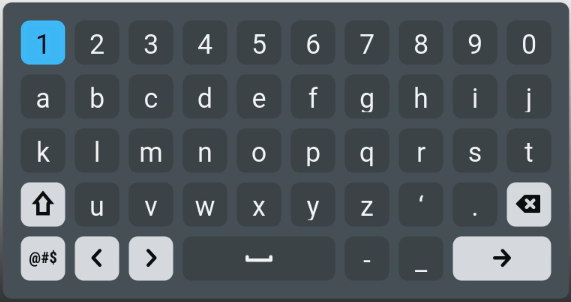
A new font has been created to include icons for virtual keyboard when using NativeInput on engines that does not support native keyboard.
NativeInputTextElementYou can now choose a text color for your placeholder. This will allow you a better customization of your inputs.
For more information, please visit NativeTextInput properties.
Both Lightning and Css native inputs now handle password types correctly and hides the entered value.

In Android and TVOS renderers, this feature is already available as it is handled natively.
In order to increase input readability in some UIs with dark colors, the native input cursor color is now binded to the text color.

This is newly available in Lightning and Css renderer. Other vendors handle it natively.
Marquee animation is reversed when current local is in right to left.
Note
Animation of marquee wil lbe reverse even if letter used in it are non-RTL characters. This only depends on current language of your application.
To stabilize RTL navigation of RecyclingList, some update have been made.
currentViewIndex of ScrollView does not exist anymore. You could find a new object currentViewPosition that carry property index.
Lightning renderer has been updated from 2.7.0 to version 2.13.1. It contains several bug fixes and performance improvements. You could enjoy this new version without any change.
More info on Lightning release note.
Method reload of RouterManager has been implemented for TVOS and Android engines. It allows you to totally reload the application.
TVOS and Android engines can now support multiple player sessions. You can display multiple streams at the same time, like for PIP or multi live experience for example. Use method getPlayerSession with different type to create multiple sessions.
When application is put in background or bring back to the foreground, event $ApplicationEvents.suspended and $ApplicationEvents.resumed are fired. You can add feature at this moment like stopping of resuming video stream.
Ad insertion is now supported on Android and TVOS devices. For more details about how to integrate this feature, visit ad insertion documentation.
wtvDebug is now available while using chrome inpector on Android. See debugging documentation for more information.
The feature DRM FairPlay for TVOS is available.
Now you can integrate the DRM in your project by following the DRM FairPlay configuration.
We notice that retrieval af native shell was taking latest minor version. This could be dangerous if CI is taking a fresh version that you haven’t tested, in particular because it could depend on a development made on JavaScript part too.
We recommend to change it be replacing from keyword in Package.swift by keyword exact.
let package = Package(
    dependencies: [
        .package(id: "dana.jscmodule", exact: "7.241.0"),
        .package(id: "dana.playermodule", exact: "7.241.0")
    ]
)reload method of RouterManager.Due to player session add and android player version upgrade, following changes are required.
In app_android/app/build.gradle, remove the following lines:
    def exoplayerVersion = '2.17.1'
    api "com.google.android.exoplayer:exoplayer-core:$exoplayerVersion"
In app_android/app/src/main/res/layout, remove player element by removing this code:
<include android:id="@+id/player"
        android:layout_width="match_parent"
        android:layout_height="match_parent"
        layout="@layout/player_view"/>
In app_android/app/src/main/AndroidManifest.xml, add following queries after </application>:
    <queries>
        <intent>
            <action android:name="android.intent.action.VIEW"/>
            <data android:scheme="https"/>
        </intent>
        <intent>
            <action android:name="android.intent.action.VIEW"/>
            <data android:scheme="http"/>
        </intent>
    </queries>
In your MainActivity.java:
WTV8RelativeLayoutimport com.dana.androidtv.v8_runtime.WTV8RelativeLayout;playerAdapter.addPlayerView call by playerAdapter.setRootView.playerAdapter.setRootView((WTV8RelativeLayout)findViewById(R.id.rendererView));UnstableApi and flag the class as unstable.import androidx.media3.common.util.UnstableApi;
@UnstableApi
public class MainActivity extends WTV8MainActivity {
}playerAdapter.playerSessionSetActive.playerAdapter.stop() by playerAdapter.stopSessions().Finally, in app_android/variables.gradle, change compileSdkVersionto 34.
compileSdkVersion = 34Due to VAST implementation, you need to add Google IMA SDK to your application.
Caution
Even if your application do not use VAST and ad insertion, this update is required.
With Xcode, open your folder app_tvos.
Go to File > Add packages dependencies. In the newly opened window, search for the IMA SDK Swift Package GitHub repository:
https://github.com/googleads/swift-package-manager-google-interactive-media-ads-tvosConfigure dependency rule as follows : Commit : 08635769971695be3d9373d7f7ee381857b2fb7b
Configure Add to project to point to your app (tvOS-App by default).
Finally, select Add package. In the prompt window, select your application on the Add to target column.
GoogleInteractiveMediaAds should have been added to your project. To ensure everything is OK, open project settings and go to Build phases. Under Link binary with libraries, check that GoogleInteractiveMediaAds has been added, otherwise add it manually by using +.
In the AppDelegate.swift file, add the following code.
Between import and class declaration, add the following code to allow exposure of reload method to the JavaScript context :
@objc protocol AppDelegateJSExport: JSExport {
    func reload() -> Void
}
Add the reload and loadApplication methods in AppDelegate class:
func reload() {
    ThreadManager.main.async {
        (self.jsExports?["renderer"] as! Renderer).clear()
        (self.jsExports?["player"] as! Player).destroy()
        (self.jsExports?["webApi"] as! WebApi).destroy()

        JSTimer.clearAll()
        ThreadManager.js?.cancel()
        ThreadManager.js = nil

        self.loadApplication()
    }
}
func loadApplication() {
let window = UIWindow(frame: UIScreen.main.bounds)
print("Main thread \(Thread.current)")
// init root view controller
let root = WTVViewController()
self.jsExports = self.loadModules(window: window, root: root)
// start app & init js thread
ThreadManager.js = JSThread(jsExports!)
ThreadManager.js!.start()
window.rootViewController = root
window.makeKeyAndVisible()
}Replace the application method:
func application(_ application: UIApplication, didFinishLaunchingWithOptions launchOptions: [UIApplication.LaunchOptionsKey: Any]?) -> Bool {
    loadApplication()
    return true
}
In loadModules method, add the application in the module array:
return [
    ...
    "AppDelegate": AppDelegate.shared! as NSObject
]You need to add the tracking service in the module list. In method loadModules of AppDelegate.swift:
let trackingService = TrackingPrivacy()return [
....
"trackingPrivacy": trackingService
]You need to add the application helper in the module list. In method loadModules of AppDelegate.swift:
let application = Application.sharedreturn [
....
"application": application
]In method loadModules of AppDelegate.swift, before call to JSTimer.clearAll(), add :
Application.shared.reset()Finally, add call to Application methods by adding the following functions in AppDelegate.swift :
    func applicationDidEnterBackground(_ application: UIApplication) {
        Application.shared.callSuspend()
    }

    func applicationWillEnterForeground(_ application: UIApplication) {
        Application.shared.callResume()
}To support key up and key down, you need to update your main.qml.tpl file.
In method Keys.onPressed, add type before sending event to keyEventAdapter :
event.type="keyDown";
global.keyEventAdapter.manageInputEvent(event);
Add a new method Keys.onReleased like this :
Keys.onReleased: {
  event.type="keyUp";
  global.keyEventAdapter.manageInputEvent(event);
}