Title here
Summary here


September 19, 20246 minutes
Native integration with home rails, support of "product-project"... Everything you need to know about 7.243 version
To better integrate Dana application in the device environment, let’s introduce new big feature : home native rails. Android and TVOS offers the ability to applications to promote their contents when user is on the device main interface. Dana abstract this functionality, so you only care about retrieving contents and they will be provided to populate rails and interface of the main UI. To start implementation, visit dedicated documentation.
To standardize the way to retrieve unique id of an application, SystemInfoService offer a new API getApplicationId. Depending on the device, you will receive the relative unique identifier.
Until then, it was possible to modify key mapping to add new key or change mapping between key code and key name. But it wasn’t possible to create a new key with its own key name (for example Netflix or customer specific button). You can now create those specific key mapping !
"KeyMapping": {
  "TRIANGLE": 42
}
_init method of services resolve by defaultEvery service offer an extension point _init that could be implemented. By default, this method was trowing an error and requested an implementation. This method is no longer required to be implemented. By default, it is now returning a resolved Promise. You can still override it if you need to.
isInteractive flag for magic remoteTo allow activation / deactivation of collision detection for pointer (like magic remote on LG), a new flag isInteractive is available on View. Default value is set to false that will prevent collision on all View. You need to specify on which View you want to activate collision to make pointer work.
For more information about magic remote, have a look at dedicated documentation
To improve product development on top of Dana, two new folders are supported by tooling :
modules-productvendors-productThose folders are working as modules and vendorsbut are expected to be used by product to isolate what is product compared to what is project.
A new method getViewByHash is available to allow you quicker access to elements. For example, if your view has an id in HTML DOM lightningRectanglePrimitive[109], you can call wtvDebug.getViewByHash("LightningRectanglePrimitive[109]").
Warning
Hash is not the same as id, first letter is in uppercase.
To better support LG magic remote, pointer is now also available with CSS renderer. For more information about magic remote, have a look at dedicated documentation.
JavaScript runtime have been refactored to remove a lot of code and to use latest version of V8 engine.
On Android TV device, application will now always be in full screen. Application will automatically scale down or up depending on the resolution of the used device.
An implementation of StorageService is available on QT devices. See migration details to add support of storage in your application.
\nWith Lightning renderer, using MeasureText.getWidth() wasn’t taking new line \n character into account. Even if text contains new line, final width was computed as if text was on a single line. On other renderers, the new line was well took into account and so final width was well reflecting the new line behaviour.
Renderers are now all taking new line character into account to measure text width.
It has been noticed that some devices where using old version of canvas which was not supporting property rtlon text. As a result, text was not displayed.
This use case as been protected and rtl flag is only added if device supports it. As a result, some device won’t support right to left properly due to technical limitation.
To support local storage, you need to add import of QtQuick.LocalStorage in main.qml.tpl :
import QtQuick.LocalStorage 2.15global.keyEventAdapter could be null. You need to surround call to it by protection if (global.keyEventAdapter != null).
    Keys.onPressed: {
        ...
        if (global.keyEventAdapter != null) {
            global.keyEventAdapter.manageInputEvent(event);
        }
    }
    Keys.onReleased: {
        event.type="keyUp";
        if (global.keyEventAdapter != null) {
            global.keyEventAdapter.manageInputEvent(event);
        }
    }
    Keys.onBackPressed: {
        if (global.keyEventAdapter != null) {
            global.keyEventAdapter.manageInputEvent(event);
        }
}To limit updates required in AppDelegate.swift file during Dana version upgrade, file has been re-written. Replace your AppDelegate.swift by following file :
import JavaScriptCore
import JscModule
import PlayerModule
import UIKit

@UIApplicationMain
class AppDelegate: DanaAppDelegate {
    override func getLoaders() -> [ModuleLoader] {
        return [
            PlayerLoader.shared,
            JscLoader.shared,
        ]
    }

    override func defineTemplateCells() {
        // define template cells for collection
    }
}
Caution
If you previously have configured custom cells for collection, put them back in defineTemplateCells method.
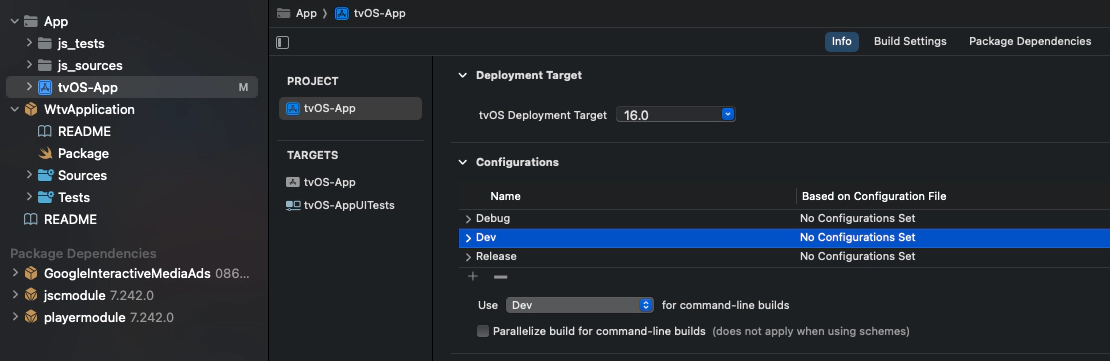
To limit configuration manipulation, in particular for signing, a new build configuration named “Dev” is required. This configuration will be used during grunt serve.
You need to set it up using XCode.
Select your project, and under Info tab, you should found Configurations settings. Click on + and select Duplicate "Debug" configuration.
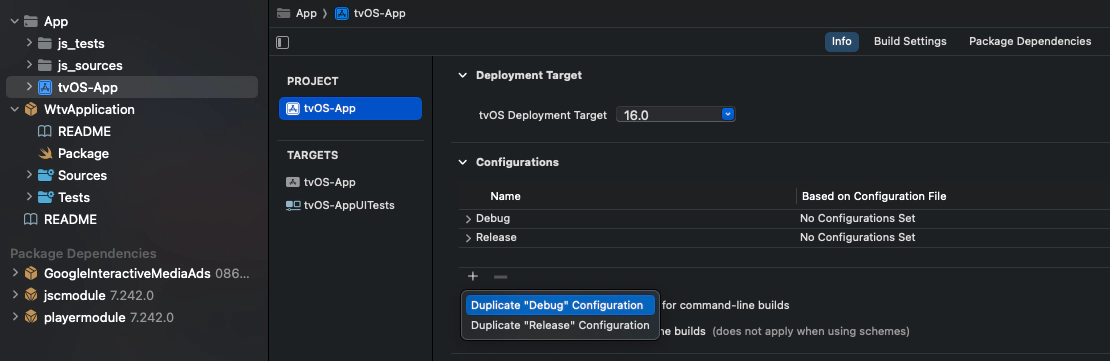
Rename the newly created configuration to Dev.
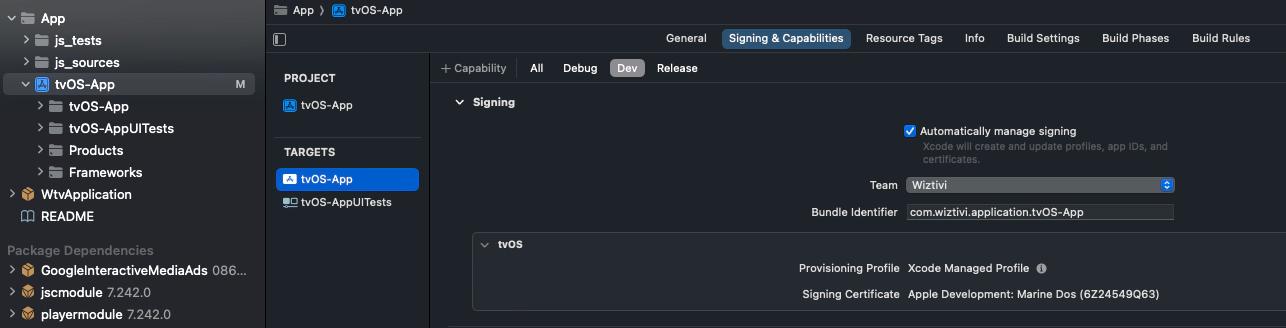
Then, select tvOS-App target, and under Signing & Capabilities tab, you can select Dev tab. Here, check Automatically manage signing. This will allow you to have a certificate for Debug and Release build but not for Dev. As a result, you will be able to use grunt serve without the certificate for deployment.
Path for entry point has been merged in a unique variable. You should remove variables for assets (assetsProtocol, assetsHotname, assetsPort, assetsPath) and add an new entryPoint variable instead.
entrypoint = project.hasProperty("ENTRYPOINT") ? '"' + project.findProperty("ENTRYPOINT") + '"' : '"https://localhost:9001/index.js"'Remove
androidxStartupRuntimeVersion = "1.1.1"Upgrade native shell to latest version :
wtvAndroidtvVersion = "7.243.5"Update -Xmx4096m to -Xmx8Gand remove -XX:MaxPermSize=512m.
Replace
ProjectBuildConfig.setBaseFilePath(
BuildConfig.ASSETS_PROTOCOL + "://" + BuildConfig.ASSETS_HOSTNAME
    + (!BuildConfig.ASSETS_PORT.isEmpty() ? ":" + BuildConfig.ASSETS_PORT : "")
    + BuildConfig.ASSETS_PATH
);
ProjectBuildConfig.setAssetsProtocol(BuildConfig.ASSETS_PROTOCOL);
ProjectBuildConfig.setAssetsHostname(BuildConfig.ASSETS_HOSTNAME);
ProjectBuildConfig.setAssetsPort(BuildConfig.ASSETS_PORT);
by
ProjectBuildConfig.setEntrypoint(BuildConfig.ENTRYPOINT);Remove player code. You have now events in JavaScript side for Application suspend / resume, if you still want to pause player on Application suspend, do it in your JavaScript application
Replace
buildConfigField 'String', 'ASSETS_PROTOCOL', project.ext.assetsProtocol
buildConfigField 'String', 'ASSETS_HOSTNAME', project.ext.assetsHostname
buildConfigField 'String', 'ASSETS_PORT', project.ext.assetsPort
buildConfigField 'String', 'ASSETS_PATH', project.ext.assetsPath
by
buildConfigField 'String', 'ENTRYPOINT', "$project.ext.entrypoint"Add ‘buildConfig’ to ‘buildFeatures’:
android {
    buildFeatures {
        buildConfig true
        viewBinding true
    }
}
Remove
implementation "androidx.startup:startup-runtime:$project.ext.androidxStartupRuntimeVersion"If you have Android modules exposed to JavaScript, you need to update them to make them works.
You can delete {NAME}ModuleInitializer classes.
Modules constructor have changed, it now takes a Context as only argument.
public ExampleModule(Context context) {
    super(context);
}Replace
<provider
    android:name="androidx.startup.InitializationProvider"
    android:authorities="${applicationId}.androidx-startup"
    android:exported="false">
    <meta-data
        android:name="com.dana.androidtv.example_module.ExampleModuleInitializer"
        android:value="androidx.startup" />
</provider>
by
<meta-data
    android:name="com.dana.androidtv.example_module.ExampleModule"
    android:value="com.dana.androidtv.v8_runtime.js.JSExported" />